You plug a scan tool into the OBD2 port, open a menu labeled “Programming,” and wonder whether you are about to change a simple setting or rewrite the module’s entire operating system. The words sound interchangeable. The consequences are not.
OBD2 coding vs. ECU programming is one of the most misunderstood distinctions in modern automotive diagnostics. A coding mistake usually leaves you with a feature that does not work. A programming failure can leave a module unable to start up at all. Treating them as the same job leads to wasted diagnostic time, unnecessary software flashes, and occasionally a bricked ECU.
This guide breaks down the technical difference in plain language, shows you how each procedure works, and gives you a practical workflow for choosing the right operation before you write anything to a vehicle.
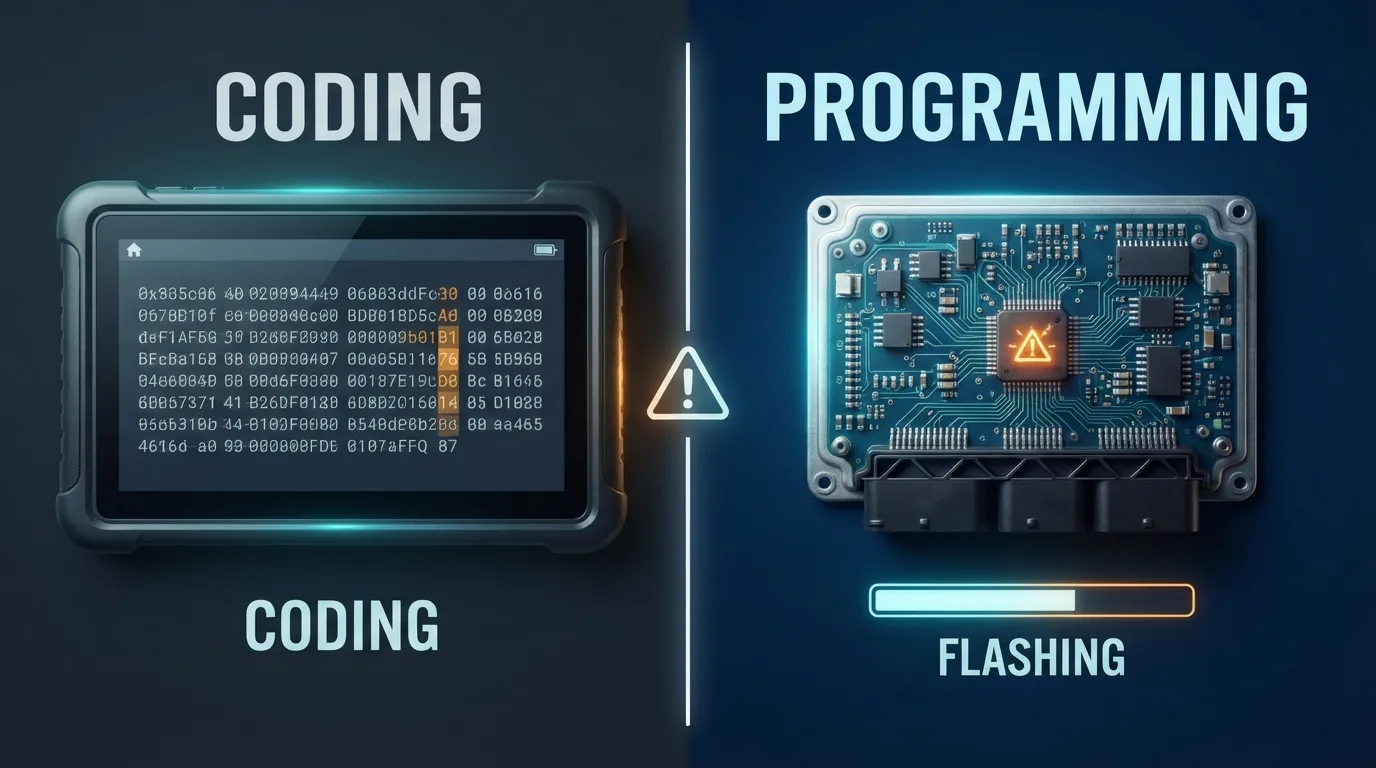
Quick answer: Coding changes the configuration of software that is already installed. Programming (flashing) replaces the software or calibration itself. Coding tells a module what car it is in; programming changes what the module is capable of doing.
What Is OBD2 Coding?
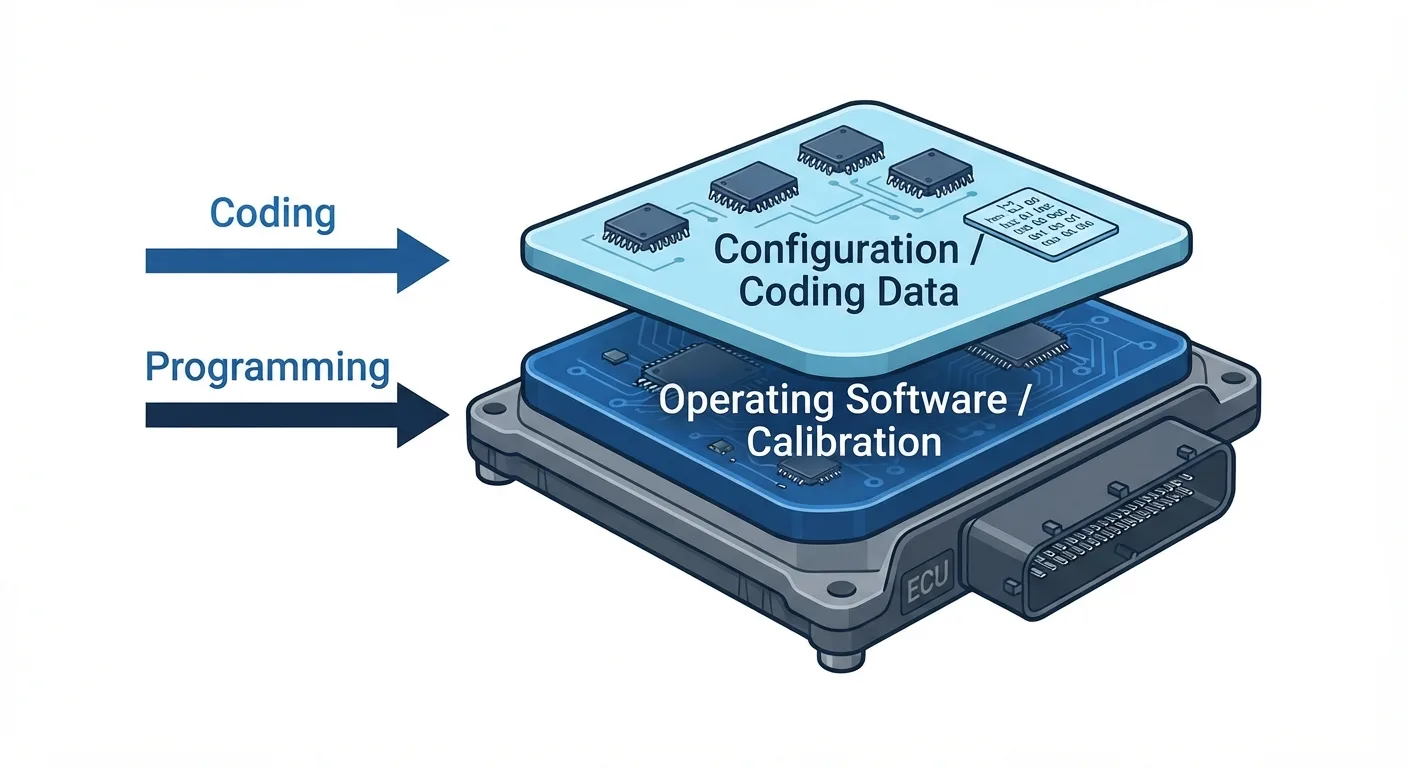
ECU coding writes configuration data into a control module so it can operate correctly in a specific vehicle. The operating software stays in place; you are changing the parameters that tell that software which equipment, variant, or market the car belongs to.
Think of the ECU as a computer with two layers. The lower layer is the operating system and application software. The upper layer is a settings file that says: this car has a tow bar, these are the headlight types, this is the correct injector classification. Coding works on that upper layer.
Short Coding vs. Long Coding
On many European platforms, especially VAG (Volkswagen Group) vehicles, coding appears in two forms:
- Short coding: A compact numeric or limited-digit value. Common on older modules using KWP protocols.
- Long coding: A hexadecimal byte string, often between 3 and 30 bytes. Each byte contains eight bits, and each bit or group of bits enables a specific function.
A long coding string might look like this:
00 00 00 00 00 00 00 00 00 00
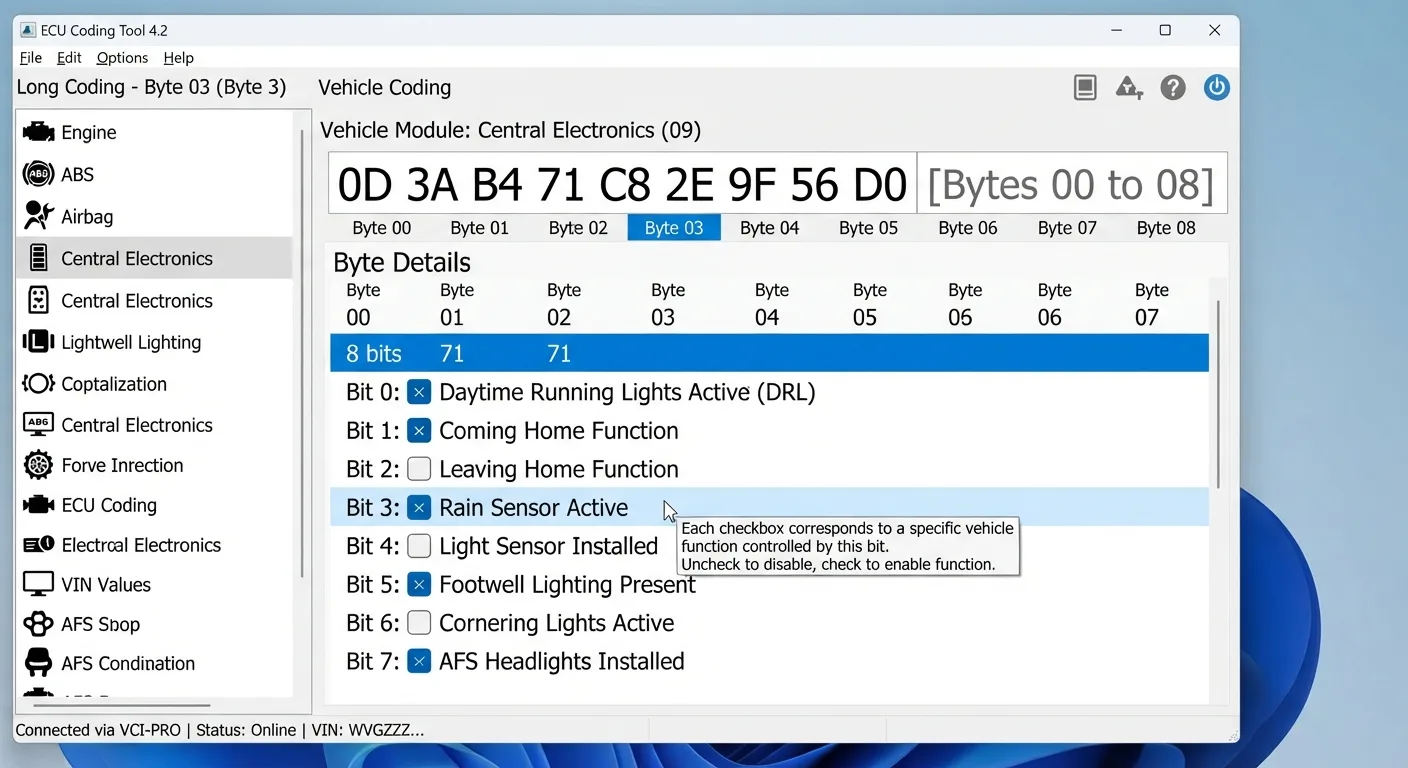
Changing a single bit in one byte can activate a feature such as cornering lights or a different cluster variant. Tools like VCDS and OBDeleven present these bytes either as raw hex or as translated checkboxes, depending on the module and the tool version.
Critical point: long coding is not universal. A module that uses long coding cannot be “short coded,” and copying a long-code string from a similar vehicle is risky. Equipment, market, and module revision must match.
What Coding Is Used For
- Installing a replacement module that arrived in a default state.
- Registering a new battery or matching injectors.
- Enabling approved retrofit features (tow bar, trailer module, comfort functions).
- Setting variant and market parameters after a module swap.
What Is ECU Programming (Flashing)?
ECU programming, also called flashing or reprogramming, erases and replaces the operating software or calibration inside the module. This is a deeper intervention than coding. Programming writes the code that tells the module how to function, not just how to behave in this particular car.
Programming is required when:
- A manufacturer releases a software update to fix a known defect or emissions issue.
- A replacement module arrives blank and needs operating software installed.
- A calibration change is needed for a powertrain or emissions-related controller.
- A module has suffered software corruption that cannot be corrected by coding or adaptation.
Programming does not automatically code or adapt the module. A module can be flashed successfully and still fail to communicate or function because it has not been configured for the vehicle.
The Key Differences at a Glance
| Feature | OBD2 Coding | ECU Programming (Flashing) |
|---|---|---|
| What changes | Configuration data, variant settings, equipment flags | Operating software, calibration, firmware |
| Typical use case | Module replacement setup, battery registration, feature activation | Software updates, blank module installation, known software faults |
| Risk if interrupted | Usually a wrong or missing setting that can be rewritten | Module may become inoperable until recovered |
| Time required | Often minutes | Often longer; requires stable power support |
| Tool requirement | Bi-directional scan tool with module write access | J2534 pass-thru, OEM software, or specialized flashing tool |
| Reversibility | Often reversible by rewriting correct coding | Not typically reversible by clearing faults; recovery may require bench or boot access |
Sources: synthesized from.
How OBD2 Coding Works: Step-by-Step
Coding is performed through the vehicle’s diagnostic connector, using a tool that supports module-level communication beyond generic OBD2 engine codes. A basic code reader cannot code; you need a bi-directional tool with manufacturer-specific coverage.
Prerequisites
- A stable power supply. Even coding can fail if voltage drops, though the risk is lower than flashing.
- The correct vehicle identification (VIN, model year, market).
- A record of the original coding values before you change anything.
- Manufacturer service information or a trusted coding reference for the specific module.
General Workflow
- Connect the tool to the OBD2 port and establish communication with the target module.
- Read and save the original coding. Do not skip this. If a change goes wrong, you need the original string to restore the module.
- Identify the correct byte and bit (for long coding) or the correct parameter (for adaptation-style coding). Use service information, not guesswork.
- Write the new value. The module may request a security access code or session before accepting the change.
- Cycle the ignition if the tool prompts you to, then re-read the module to confirm the new coding is accepted.
- Scan for faults. A coding change can trigger communication faults in other modules if the configuration is inconsistent.
Practical example: Replacing a body control module on a VAG vehicle. The new module may communicate immediately but report missing features or communication errors until the correct long coding string is written. Flashing the module would not solve this; coding is the required step.
How ECU Programming Works: OBD, Bench, and Boot
Programming can be performed through several access methods, and the method you choose affects both capability and risk.
OBD Programming
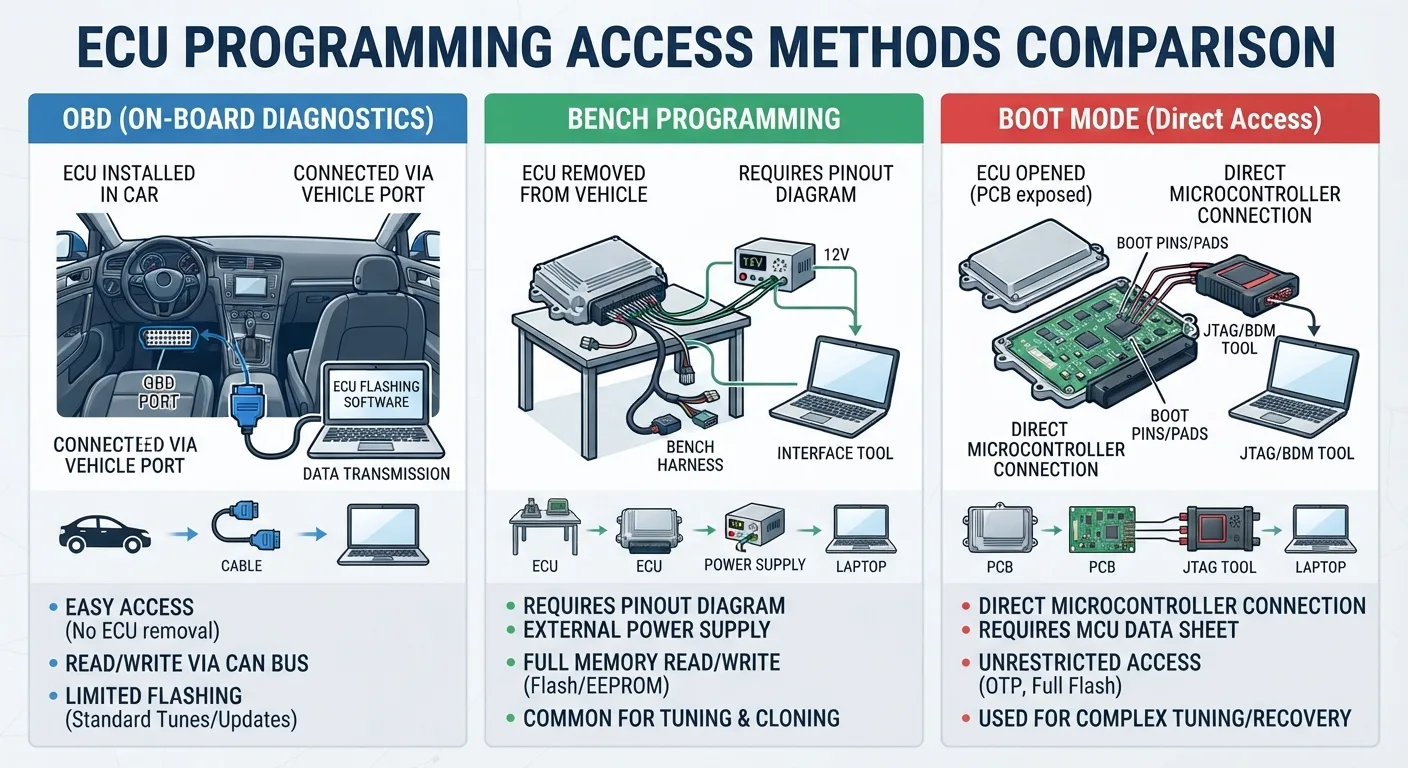
The programming device connects through the vehicle’s diagnostic port and communicates over the in-vehicle network. This is the most convenient method when supported, because the ECU stays installed.
Limitations: OBD access does not provide unrestricted access to every memory area. Some ECUs allow reading and writing through OBD, but not full flash or EEPROM backup. Other controllers require bench or boot access for the intended operation.
Bench Programming
The ECU is removed from the vehicle and connected directly to a programming device using its power, ground, and communication pins. This provides a controlled environment and can support operations that OBD cannot reach.
Risks: Bench work demands accurate wiring information. Incorrect power or communication connections can damage the controller.
Boot Mode
Boot mode accesses the microcontroller through a lower-level startup or service condition. It is used for selected protected ECUs and operations that require deeper access than OBD or bench provides. Boot mode may require opening the ECU housing and careful pin access.
J2534 Pass-Thru Programming
SAE J2534 defines a standardized interface between a PC and a vehicle, allowing independent technicians to run OEM programming software through a compatible Vehicle Communication Interface (VCI).
J2534 is a communication standard, not a software entitlement. You still need the correct OEM application, calibration access, subscription, and vehicle support. A J2534-capable device does not automatically program every module on every vehicle.
Requirements and Prerequisites for Programming

Programming is less forgiving than coding. Before you start, confirm every link in the chain.
| Requirement | Why It Matters |
|---|---|
| Stable power supply | A voltage drop during a write can corrupt the module and leave it inoperable. Use a flash-rated power supply capable of holding system voltage, not a trickle charger. |
| Correct ECU identification | The file must match the exact part number, hardware revision, and software identification. A plausible-looking file is not necessarily compatible. |
| Approved software and access | OEM software, subscriptions, security access, and calibration files may be separate purchases or authorizations. |
| Supported interface and drivers | The VCI, driver, firmware, and OEM application must be a validated combination for the intended operation. |
| Backup of original data | Preserve original ECU data before writing. Keep original files separate from modified working copies. |
| Documented recovery path | Know what you will do if the write fails. Not every ECU supports recovery through the same method that was used for programming. |
Practical Use Cases: When to Code and When to Program
Scenario 1: Replacing a Body Control Module
A used or new body control module is installed. The module may communicate, but features are missing and fault codes appear.
- Required: Coding. The module needs to know the vehicle’s equipment and variant.
- Not required: Programming, unless the replacement module is blank or the manufacturer specifies a software update as part of the installation.
Scenario 2: Installing a Blank Replacement ECU
A new engine control module arrives without operating software.
- Required: Programming. The module needs the correct software and calibration installed before it can function.
- Also required: Coding and possibly adaptation after programming. Flashing installs the software; coding personalizes it to the vehicle.
Scenario 3: Manufacturer Software Update
A technical service bulletin specifies a calibration update to correct a drivability or emissions issue.
- Required: Programming (flashing). The software itself is being replaced.
- Not a substitute: Coding. Coding cannot change the operating strategy or fix a software defect.
Scenario 4: Battery Registration or Injector Matching
A new battery is installed, or diesel injectors are replaced.
- Required: Coding or adaptation. These are configuration and learning procedures, not software replacement.
Advantages, Disadvantages, and Limitations
Coding
Advantages:
- Lower risk than flashing; an incorrect setting can often be corrected by rewriting the original coding.
- Fast; many coding jobs take minutes.
- Enables features and configurations without replacing software.
Disadvantages:
- Cannot fix software defects or install new operating software.
- Incorrect coding can disable systems or create faults that look like hardware failures.
- Not all tools support all modules; basic code readers cannot code at all.
Programming
Advantages:
- The only way to update, repair, or install operating software.
- Essential for blank module setup and manufacturer-required updates.
- J2534 pass-thru gives independent shops access to OEM reprogramming workflows.
Disadvantages:
- High risk if interrupted; a failed write can brick the module.
- Requires stable power, correct files, compatible hardware, and often paid OEM access.
- Does not automatically complete the repair; coding and adaptation may still be needed.
Common Problems and Troubleshooting
The module does not accept coding
- Confirm the tool supports write access to that module. Reading codes successfully does not prove coding capability.
- Check security access. Some modules require a login or session before accepting configuration changes.
- Verify the coding value against the correct vehicle specification and module revision.
Programming fails partway through
Do not immediately repeat the write. Record the error message, the stage at which the operation stopped, and whether power or communication was lost.
- Check power first. Verify that the supply meets the ECU’s documented requirements and that connections are secure.
- Confirm communication. Can the tool still identify the ECU? Does another module still communicate?
- Verify the file. Check the part number, software identification, memory region, and checksum requirements.
- Use the documented recovery method. Recovery through the existing connection, bench access, or a specialized procedure depends on the controller and the failure stage.
The module communicates but the vehicle does not run correctly
A successful flash does not mean the job is finished. The module may still need coding, adaptation, or a relearn before it operates correctly in the vehicle.
Security, Privacy, and Best Practices
- Save original data. Before any coding or programming, back up the original module identification and configuration data where supported.
- Use legitimate software sources. Do not download calibration files or “cracked” OEM software from unverified sources. Corrupt or incompatible files are a leading cause of failed writes.
- Respect security gateways. Modern vehicles use protected gateways (e.g., VAG SFD, FCA SGW) that require authentication or manufacturer authorization for certain functions. A compatible tool does not bypass these requirements.
- Do not program on a weak battery. A “fully charged” battery can sag during a programming session. Use a flash-rated power supply for every write, including short configuration writes if the manufacturer specifies it.
- Keep a written record. Document the tool, protocol, file, and outcome. This is invaluable if a recovery is needed later.
Frequently Asked Questions
1. Is OBD2 coding the same as ECU programming? No. Coding changes configuration data inside existing software. Programming, or flashing, replaces the software or calibration itself.
2. Can a basic OBD2 scanner perform ECU coding? No. Basic code readers can read and clear generic powertrain codes but lack the bi-directional, module-level access required for coding. You need a mid-to-high-tier bi-directional scan tool or OEM software.
3. Can I code a module with a tool that only does OBD2 diagnostics? Diagnostic capability and coding capability are different. A tool may read fault codes from a module but not write configuration to it. Verify write support for the exact module before starting.
4. Does programming automatically code the module? No. Flashing installs software. Coding personalizes that software to the vehicle. A flashed module may still need coding and adaptation before it functions correctly.
5. What happens if ECU programming is interrupted? The outcome depends on the ECU and the stage of the interruption. The module may continue communicating, become temporarily inaccessible, or require a specific recovery procedure. A failed write does not automatically mean permanent damage, but repeated writes without diagnosis increase risk.
6. Is J2534 the same as ECU programming? No. J2534 is a standardized communication interface. Programming requires OEM software, calibration access, and vehicle support in addition to the interface.
7. Can I program an ECU through the OBD2 port? Yes, for supported vehicles and operations. OBD programming is convenient but does not provide unrestricted access to every ECU memory area. Some controllers require bench or boot access for certain operations.
8. What is long coding? Long coding is a hexadecimal configuration string used on many modern modules, especially in VAG vehicles. Each byte and bit controls specific functions or parameters. It is a form of coding, not programming.
9. Do I need a power supply for coding, or only for programming? Stable power is important for any write operation. For programming, a flash-rated power supply is effectively mandatory. For coding, follow the manufacturer’s requirements; a weak battery can still cause a write to fail.
10. What should I do if coding is rejected? Verify the tool’s write support, the security access requirements, and the coding value against the correct vehicle specification. Do not copy coding from a similar vehicle without confirming equipment and module compatibility.
Final Thoughts
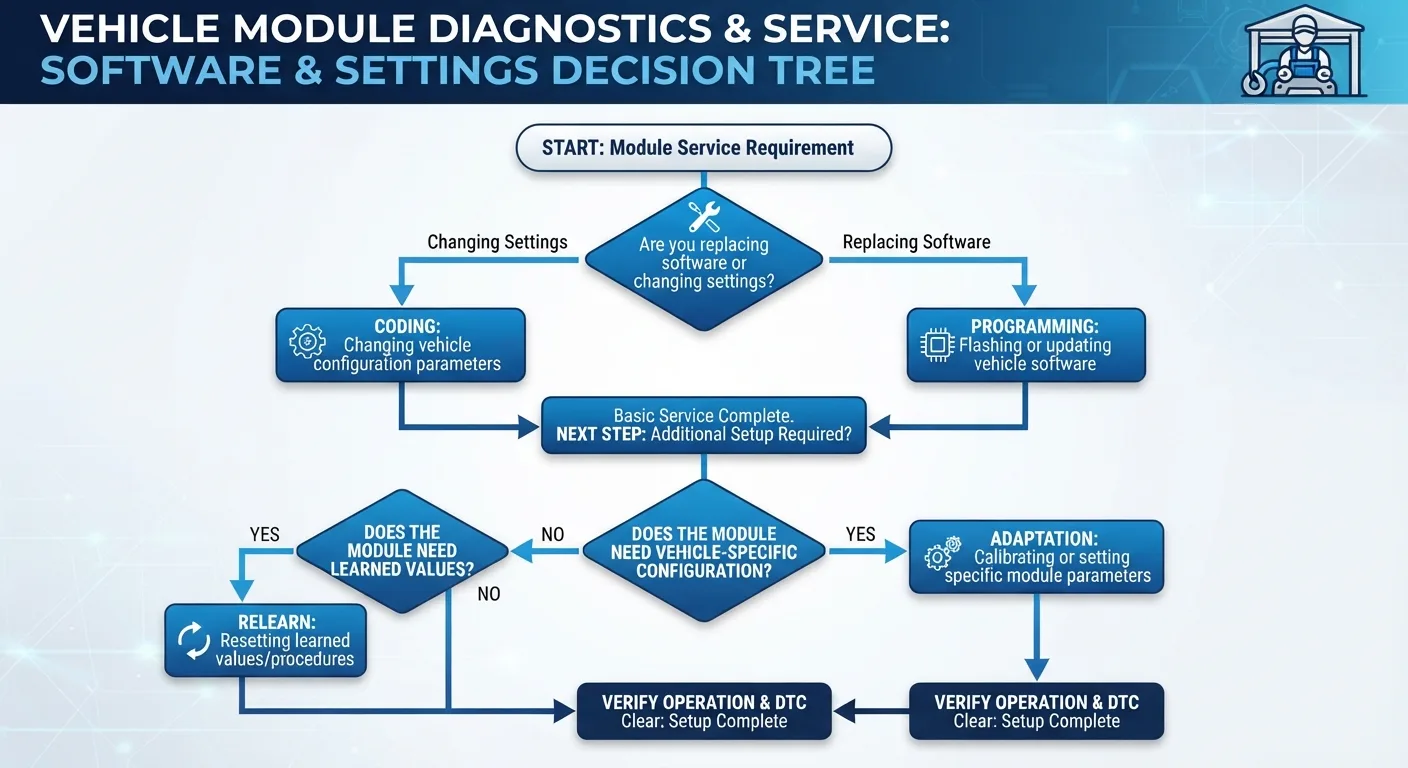
OBD2 coding vs. ECU programming comes down to a single question: are you changing the settings of existing software, or are you replacing the software itself?
Coding is the lighter, faster, and usually safer operation. It configures a module to work in a specific vehicle. Programming is the deeper operation. It writes the software that makes the module function at all, and it carries a higher risk if power, files, or communication fail.
Before you connect a tool, ask three questions:
- What is being written? Configuration data or operating software?
- What does the manufacturer specify for this repair? Coding, programming, adaptation, or a combination?
- What happens if the session fails halfway? Do you have the original data, a stable power supply, and a documented recovery path?
If you are comparing tools for your workshop, look beyond the label on the box. Check whether the tool supports coding, programming, or both for the specific modules you work on. A tool that advertises “programming” may not perform the coding and adaptation steps that complete the repair.
Next step: Audit your current diagnostic tool’s capabilities against the vehicles you service most often. Confirm write support, power supply readiness, and access to OEM software or J2534 workflows before the next module replacement lands on your bench.